
OopBuy Warehouse: Confirm the Items in Scope
Before taking an OopBuy warehouse or parcel action, reconcile three things: what you intended to buy, what the account records as received, and what you now want packed together. Keep the option, quantity and relevant date with each item. A warehouse event does not automatically establish that every product question is settled.
Match the received piece to the planned item
Start with the order record, not just a familiar thumbnail. Open the white floral-lightbulb T-shirt if you need to identify the design in your saved list. That public reference does not show which size you ordered or whether your piece has arrived. Check those details in the relevant private record.
For a hypothetical two-item order, one received top and one pending pair of trousers should remain separate entries. You can estimate a future parcel containing both, provided you label its inputs as assumptions. Do not describe that scenario as the measured weight or dimensions of a completed package.
Check what the images actually cover
A QC photograph can show the quantity visible in its frame. It may not show every item in the order or establish that all pieces are ready for the same action. Compare the account's item references and quantities before concluding that the whole selection is present.
Keep unresolved product questions beside the affected item. A request for a measurement is not a completed measurement, and an acknowledgement is not proof that a requested change occurred. Use the size guide when the open question concerns how a dimension was taken.
Read the storage clock for the right case
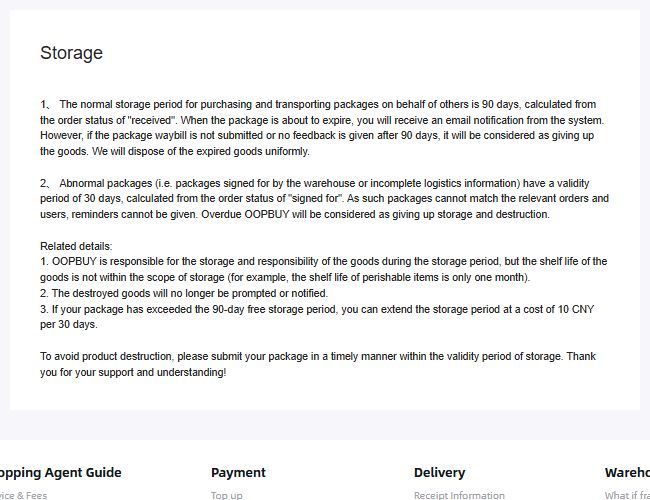
Captured policy view saved on 10 September 2026. It documents the wording visible then, rather than a completed extension or a reminder sent for your purchase.
An archived OopBuy storage-policy image from 10 September 2026 described normal storage as 90 days from received status. It separately described a 30-day period from signing for abnormal, unmatched packages, for which reminders could not be provided. The text warned about disposal after expiry and described an extension of normal storage at 10 CNY per 30 days beyond the free period.
This historical description does not establish your item's present deadline or today's account terms. Check the applicable case, starting event and current instructions in your own record. The date you saved a product is not the date the warehouse received it. Clarify a deadline before relying on an expected reminder or assuming an extension has been applied.
The shelf-life exclusion in that notice is another reason to review items individually. Even if storage remains available, a product with an expiry condition may require an earlier decision. Do not use the longest warehouse period as a substitute for the item's own condition or date information.
Choose the parcel contents deliberately
Keep alternatives out of the intended parcel unless you actually decided to buy and include them. When you add, remove or replace an item, revisit the shipping-calculator inputs. A previous estimate belongs to its previous contents and packing assumptions.
Read the scope of any offered packing option before selecting it. A smaller-looking package does not by itself prove a saving or suitable protection for every item. Ask support about the particular option when its effect is unclear rather than importing instructions from another customer's shipment.
Use receiving instructions, not a guessed warehouse address
If a service requires you to supply an address or reference for receipt, obtain the current instructions for that service through a verified account route. A company contact address, app-developer address or old screenshot is not automatically the destination for your package. Do not guess missing address fields or identifying codes.
Keep those details private. For the next stage, the order-status guide separates the item record from parcel dispatch, and the tracking guide applies once you have a correctly assigned shipment reference.