
OopBuy Shipping: Read an Estimate Without Mixing Stages
An OopBuy shipping estimate answers a question about a particular set of parcel inputs. To compare it with another estimate, keep the destination, contents, weight and dimensions consistent. To compare it with a payment, establish what the payment actually includes.
Start with the shipping calculator guide if you are gathering those inputs. If the item has not reached the parcel stage, use order status first rather than counting the entire order process as shipping time.
Read an estimate as inputs plus a result
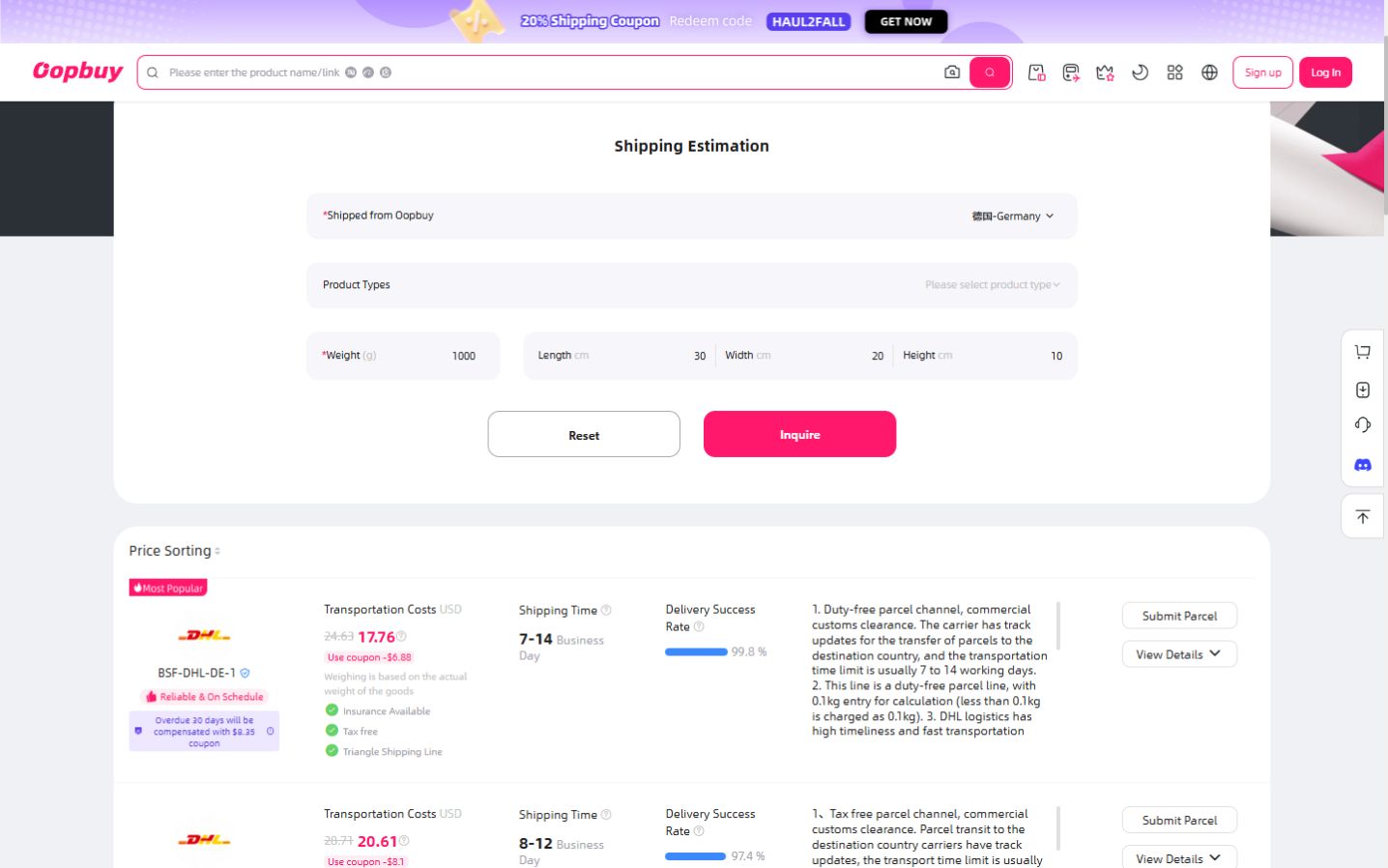
An OopBuy calculator screenshot archived on 10 September 2026 used Germany, 1,000 g and 30 × 20 × 10 cm. Its first displayed route, BSF-DHL-DE-1, showed USD17.76 with a coupon annotation and 7–14 business days. The product-type field was unselected. The archive date does not establish when that quote was issued or how long it remained available.
That last detail prevents treating the result as confirmed eligibility for a specific item. The displayed time is also an estimate, not evidence of a delivered parcel. For the German-language explanation, see Versandkosten nach Deutschland.
The example is useful because it shows the information that must travel with a number. Copying only USD17.76 into a budget would lose the date, parcel assumptions and offer context that gave the amount meaning.
Compare routes without changing the parcel
Use the same destination and parcel assumptions when comparing route results. If you also change the weight or dimensions, you are comparing different packages as well as different services. Keep those comparisons separate so you can understand the reason for a difference.
Read the conditions for your contents rather than assuming every displayed service accepts them. A route name, familiar carrier branding or a low displayed amount does not answer that question on its own.
When the contents change, revisit the estimate. A removed item may affect both weight and packaging, while an added item may require different dimensions. Do not assume the new price follows a simple per-item or per-kilogram proportion.
Keep product weight and parcel measurements distinct
The product reference helps identify what you plan to send. The packed parcel introduces packaging and a physical arrangement. If you only have product-level information, do not label its sum as a confirmed packed weight.
View the mint-green knit sweater listing to identify a potential item in your plan. Its title does not establish the selected size, packed weight or delivery charge. If options or details are still loading, do not fill those gaps with guessed measurements. Read the warehouse guide for the transition from individual items to parcel planning.
For any volumetric calculation, use the conditions applicable to the selected route. Do not borrow a divisor from another service and present the result as OopBuy's billable weight. When an input is still approximate, keep that uncertainty visible in your own budget.
Check what the amount includes
Separate the item amount, parcel estimate and confirmed charge in your records. A coupon annotation is not proof that the same offer is available now or applies to your account. Compare the applicable amount at the relevant step before authorising payment.
Keep currency explicit. A figure shown in USD is not the same numerical cost in your home currency, and any conversion needs its own date and payment context. Do not combine converted and unconverted figures in one total.
Likewise, do not infer the treatment of import charges from a price alone. Read the service description and the information for the actual shipment. The German customs article discusses that distinction for its German-language audience without calculating a charge for your parcel.
Measure time between the right events
Ordering an item, warehouse processing, carrier acceptance and delivery are different milestones. Before using a quoted range, establish which interval it describes. Do not automatically start a transport estimate on the day you selected the product.
Once dispatched, follow the actual tracking record. The delivery-time guide helps organise dated events without turning another buyer's experience into a deadline for your shipment.
If a status is unclear, keep the last visible message and its date. Ask a specific question through support, rather than assuming that an old calculator range explains the delay.
Frequently asked questions
Can I reuse a quote for another destination?
No. Recalculate for the intended destination and parcel. Even the same contents do not make two destination quotes interchangeable.
Is a cheaper result necessarily the better choice?
First check applicability, included services and the timing information. An amount that does not apply to your contents is not a usable alternative.
Do displayed business days prove when I will receive the parcel?
No. They are an estimate with a particular scope. Actual dated shipment events describe what has happened to your parcel.
What should I do after changing my haul?
Revisit parcel assumptions and the available estimate before the next commitment. The spreadsheet guide helps retain the connection between item choices and later parcel decisions.